

Getting Started guide
The first document that new users should turn to is the Getting Started with MacVector guide. This document is geared for both new users and introduces you to the new functions and features in recent versions.
Weekly Tips
Make sure you are signed up to our weekly email with tips on using MacVector. Most of the tips are answers to questions that have recently been asked by users. We think that if someone has a question about it, then others probably do too! Every email is very short, just one or two paragraphs with a single image. We will never forward your information on to a third party and you are able to easily unsubscribe from these emails.
You can view past newsletters and hopefully you may find some useful tips!
Videos
We have many video tutorials (short and long) on using MacVector. Our YouTube channel has many, but you may also browse the videos here too.
Tutorials
In the documentation folder right in the MacVector application folder you will find some PDF tutorials. All these tutorials are based on using sequence files that you will find directly in the Tutorial Files folder of the MacVector application.
- In the Finder menu click GO > APPLICATIONS > MACVECTOR > DOCUMENTATION
- In MacVector click HELP > TUTORIALS
Up to date tutorials are always available on our website.
Workflows
Here are some workflows that your average molecular biologist can use MacVector for.
- Common workflows
- Primer design workflows
- Comparing sequences
- Getting your sequences into MacVector
- Assembling sequencing data
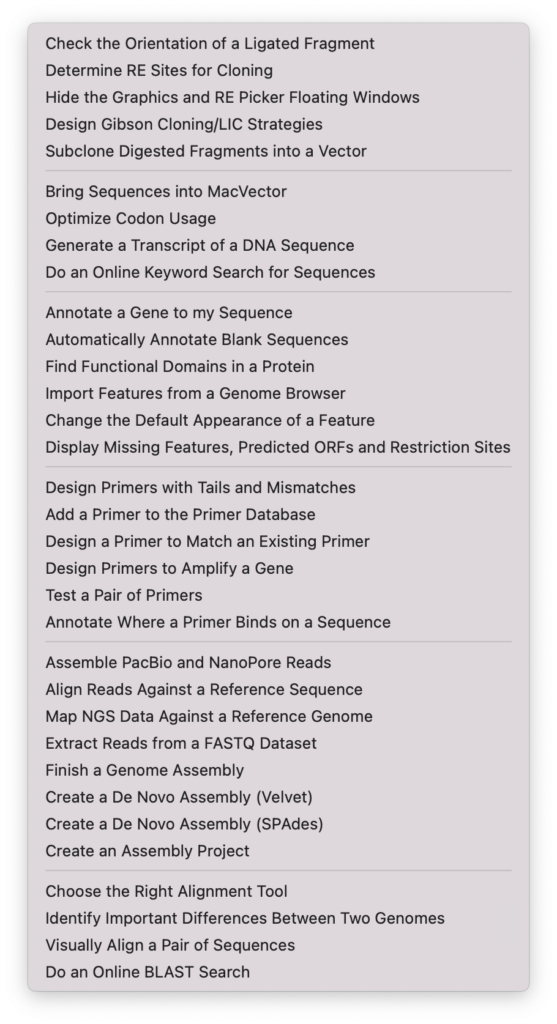
How Do I? Menu
The menu bar of MacVector contains a menu which lists common workflows that a molecular biologist may need. Each topic has a short video and/or a short step by step guides. Plus every tool in MacVector has a link to a video tutorial from its dialog.
What’s New in MacVector
Here’s a list of all new features over the many versions.
Before you go…
…. watch this video on how to directly download a sequence into MacVector from the Entrez database. If there’s a gene or plasmid that you regularly use then all you need is its accession number to download a fully annotated copy directly into MacVector It’s always better to learn with your own sequences!